几个月不见了又是,忙着处理现实事务的同时,也随便看看 fvn 的发展。

有些游戏掉了队

一些开发周期悠久的游戏(挖坑很久的游戏)为了减小文件体积,会用一个已经停止维护的插件 2D Toolkit,这个插件的作用是将许多相似图片切割,共同部分只存储一份,并在游戏运行时还原为单独的图片。对于只有表情、动作、服装等变化的立绘和同一组CG中极其相似的图片,这种切图方式可以很有效地减少图片资源的体积。

尽管现在的游戏对于空间的限制更宽松了,新游戏有的仍会用这个方案,github上有个 sprite dicing 开源仓库,提供插件和独立程序,对于图片量巨大的游戏仍然能够起到减小资源包体积的作用。

讲完了好处讲讲坏处,坏处就是我们直接用 AssetStudio 打开不能直接看到图片了,只有一堆一堆碎块拼成的大图,名字一般叫 *Atlas,为了看到游戏里真正的图片,我们需要还原这些 Atlas。

找找坐标

找……找对了吗

古法 AI 启动!

Assembly-Csharp.dll放到 Dnspy 里,交给Deepseek研究图片系统的组成,它非常深刻地径直发现了战斗爆衣系统(×)同时也稍微提到了 Spine 和 Atlas 的部分。爆衣系统虽然很喜闻乐见,但是这不是我们的重点,先行忽略。在深入追问 Spine 之后,成功还原了角色的战斗动画。

示例图片()看出什么都别说嗷
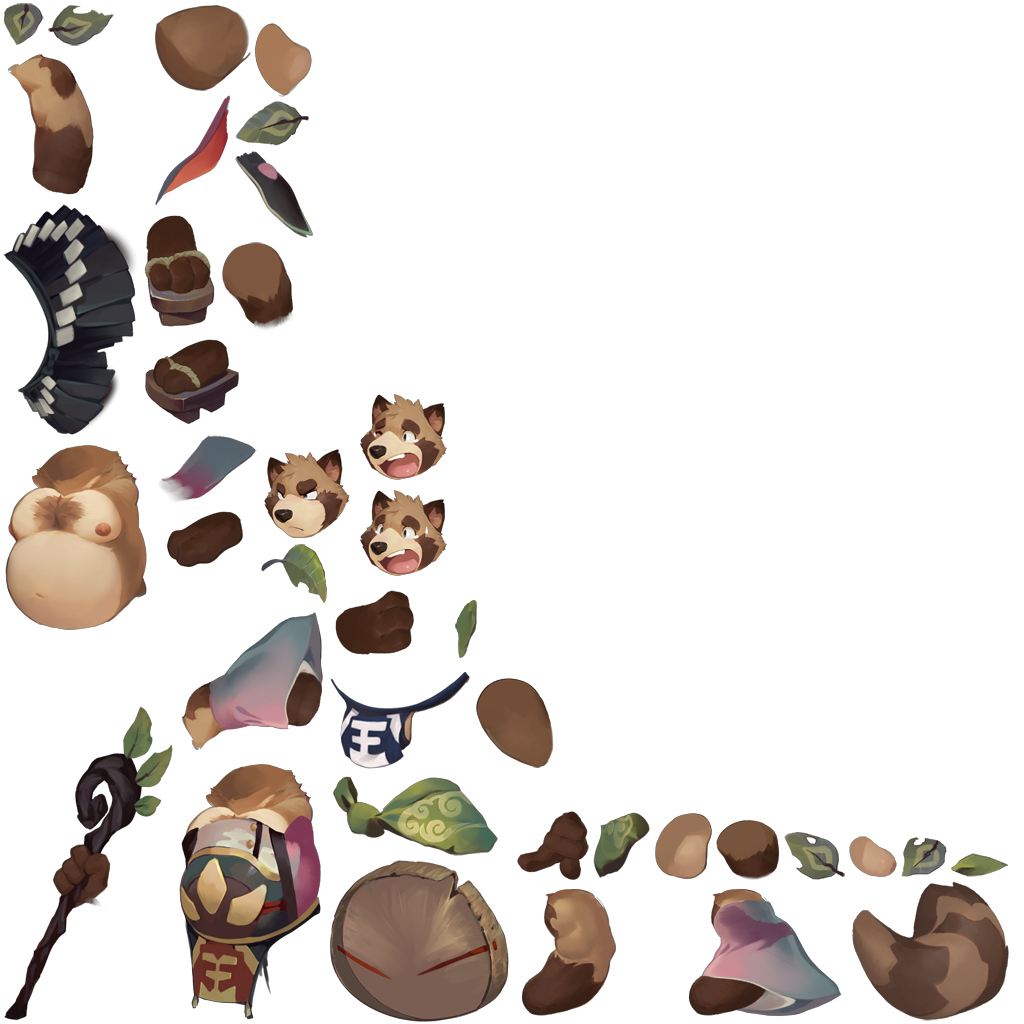
Aoba

这种图片其实不在我们讨论的范围,但是既然找到了,就写出来供参考。

以上面的图片Aoba.png为例,这是直接用AssetStudio导出的图片文件,可以看出它由若干小部件组成。同时,在TextAsset文件夹中有相应的aoba.atlasaoba.txt,且txt实际上是json文件。改名为 json,并将上述三个文件放在一起即可。同样的方法找到其他后缀名为atlas的文件和配套图片、json,全部放在一起备用。

至于观看,在神秘论坛找到一个帖子,是预览 Spine 的查看器,体验了一下效果还不错,该有的功能都不缺,很全面。具体用法参考帖子内说明,此处不再详述。

回到Atlas上吧

Deepseek 从Assembly-Csharp.dll中找到了这里的Atlas们是用tk2d切分的,于是我搜索了一下相关的信息,找到帖子棕色尘埃1拆包求助,虽然在这里没有找到解法,但是知道了tk2d是个啥。

后来在某神秘网站浏览的时候发现一些前辈的相关尝试与代码,下载到了前辈的还原代码,至少有思路了。

1
2
3
4
5
6
7
8
9
10
11
12
13
14
15
16
17
18
19
20
21
22
23
24
25
26
27
28
29
30
31
32
33
34
35
36
37
38
39
40
41
42
43
44
45
46
47
48
49
50
51
52
53
54
55
56
57
58
59
60
61
62
63
64
65
66
67
68
69
70
71
72
73
74
75
76
77
78
79
80
81
import json
import re
import os
import math
from PIL import Image

def Extract():
folder_a = 'Texture2D文件夹地址'
folder_b = 'MonoBehaviour文件夹地址'
output_base_folder = '输出图片的地址'

for filename in os.listdir(folder_a):
if re.search(r'_Atlas\d+\.png$', filename):
# 获取图片的完整路径
img_path = os.path.join(folder_a, filename)

# 使用PIL打开图片并获取大小
img = Image.open(img_path)

# 打印图片的名字和大小
print(f"Image Name: {filename}, Size: {img.size}")

# 构建对应的JSON文件名
json_filename = re.sub(r'_Atlas\d+\.png$', '.json', filename)
json_path = os.path.join(folder_b, json_filename)

# 检查JSON文件是否存在
if os.path.exists(json_path):
# 加载JSON文件内容
with open(json_path, 'r', encoding='utf-8') as json_file:
data = json.load(json_file)
js = data

cellSize = js["cellSize"]
padding = js["padding"]
paddingCellSize = cellSize - padding * 2
textureDataList = js["textureDataList"]
width, height = img.size
atlasCellCountX = math.ceil(width / cellSize)
atlasCellCountY = math.ceil(height / cellSize)

cells = []
for y in range(atlasCellCountY - 1, -1, -1):
for x in range(atlasCellCountX):
c = img.crop((x * cellSize, y * cellSize, (x + 1) * cellSize, (y + 1) * cellSize))
c = c.crop((padding, padding, padding + paddingCellSize, padding + paddingCellSize))
cells.append(c)

dest_folder_name = os.path.splitext(filename)[0] # 创建目标文件夹名称
dest_folder_path = os.path.join(output_base_folder, dest_folder_name) # 创建目标文件夹路径
os.makedirs(dest_folder_path, exist_ok=True) # 创建目标文件夹

# 过滤出属于当前图片的纹理数据
base_filename = os.path.splitext(filename)[0] # 去掉扩展名
filtered_textureDataList = [tex for tex in textureDataList if tex.get("atlasName", "").startswith(base_filename)]

for tex in filtered_textureDataList:
cellX = math.ceil(tex["width"] / paddingCellSize)
cellY = math.ceil(tex["height"] / paddingCellSize)
coords = [(xb * paddingCellSize, tex["height"] - (yb + 1) * paddingCellSize,
(xb + 1) * paddingCellSize,
tex["height"] - (yb) * paddingCellSize)
for yb in range(cellY) for xb in range(cellX)]

result = Image.new(img.mode, (tex["width"], tex["height"]))
count = 0
for cellIndex in tex["cellIndexList"]:
count += 1
if cellIndex == 0:
continue
try:
result.paste(cells[cellIndex], coords[count - 1])
except IndexError:
print(f"Warning: Index out of range for cellIndex {cellIndex} in texture {tex['name']}")
break

# 保存图像到目标文件夹中
result.save(os.path.join(dest_folder_path, tex["name"].replace('/', '-') + ".png"))

Extract()

(没有if __name__ == "__main__"看着不得劲×)

只用看前面几行即可,这份代码最大的用处在于告诉了我坐标文件可以在MonoBehaviour中提取,因此我们可以把还原Atlas的重心放在找MonoBehaviour上。对于tk2d,代码中读取的json项都不存在,不能用来还原图像。

AssetStudio

虽然现在提到Unity提取资源都会想到AssetRipper,但实际上AssetStudio还是有继任者的,现在还在更新的继任者有https://github.com/aelurum/AssetStudio,可以多准备几个不同版本,都拿来碰碰运气。

想要在AssetStudio中打开MonoBehaviour时,会弹出选取文件夹的界面,如果Unity游戏是Mono架构,直接选Managed文件夹,否则需要先用Il2cppDumper导出dll后才能读取。运气很好,我研究的游戏因为很古老(新的也用不了tk2d),直接是Mono,很方便地提取出所有资源。

我们尤其关注一下和tk2d有关的东西,首先我们可以假设这些Atlas都是插件自动生成而不是人工操作的,这样生成的文件多少应该带有和tk2d相关的信息。于是在MonoBehaviour中搜索tk2d,巧合的是所有带tk2d的文件都是MonoBehaviour。
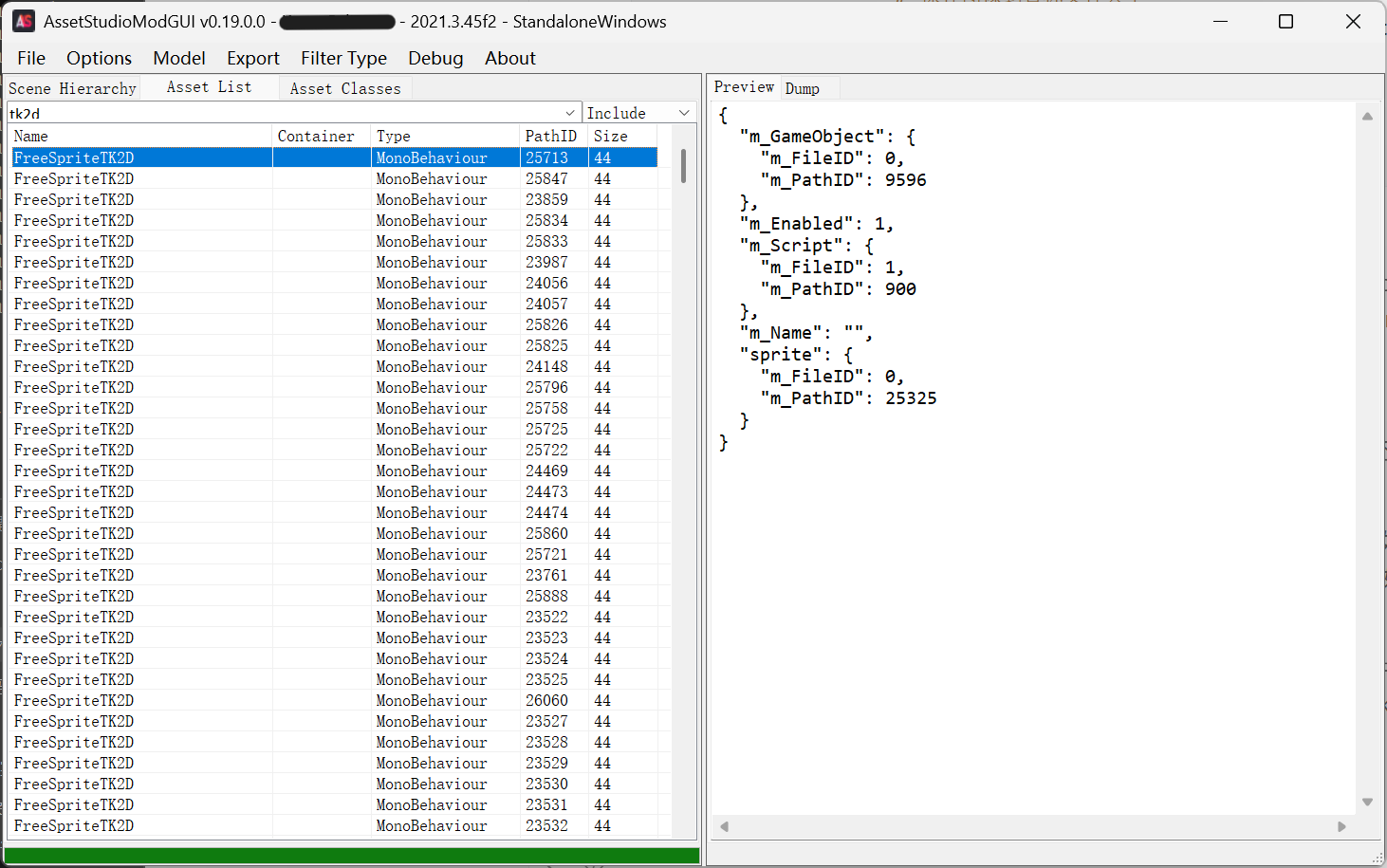
AS

和上面偷看Spine一样,优先从最大的文件开始看。既然碎图都被切割得不成样子了,重建步骤相比也是很艰巨。

同样来一张示例图片。
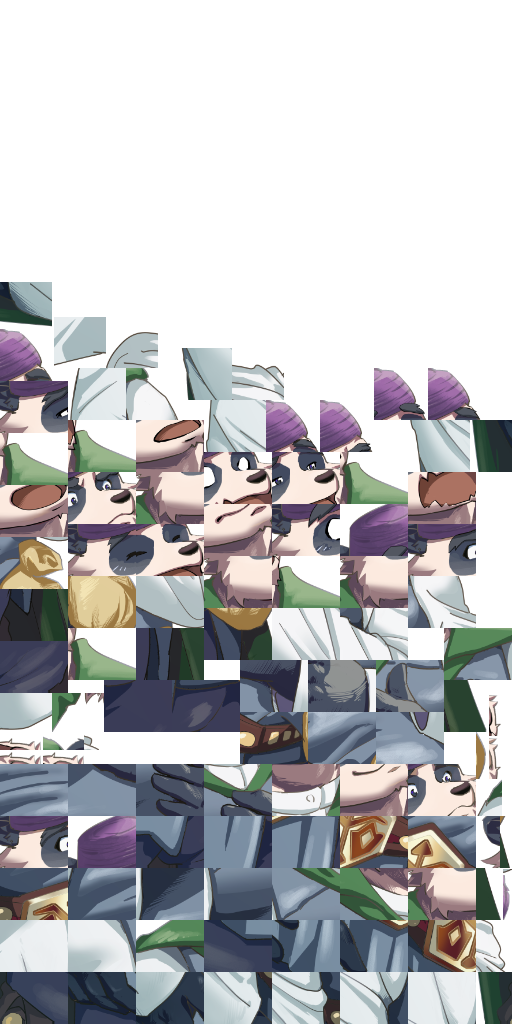
atlas0

图片上半部分是透明的,因为不需要那么多色块,勉强可以看出不同的面部表情和紫色帽子等,衣服切得比较碎,可能能看出花纹。这种情况下为了定位每一个块,想必需要存储很多很多数据。
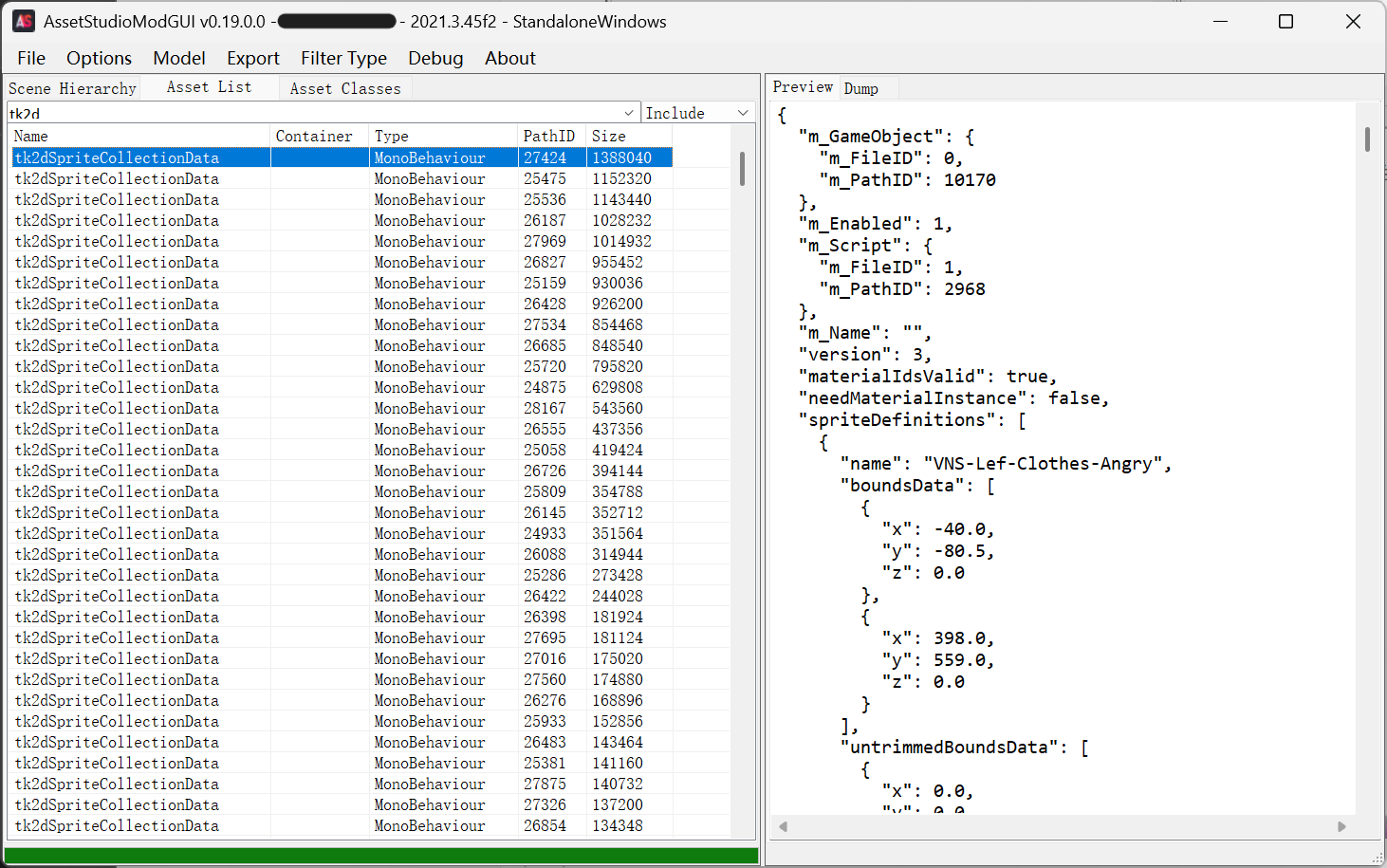
AS2

大小靠前的全是tk2dSpriteCollectionData,查证了Gemini老师后它说这就是我们需要的坐标文件。前面我们已经导出了所有资源,确认之后发现Atlas图片和这里的Data都是83个文件,初步验证通过。

交给AI?

剩下的工作想必非常简单,让AI读取这些json文件中的坐标,写一份还原的代码即可。但是实际工作中遭遇了各种阻碍()

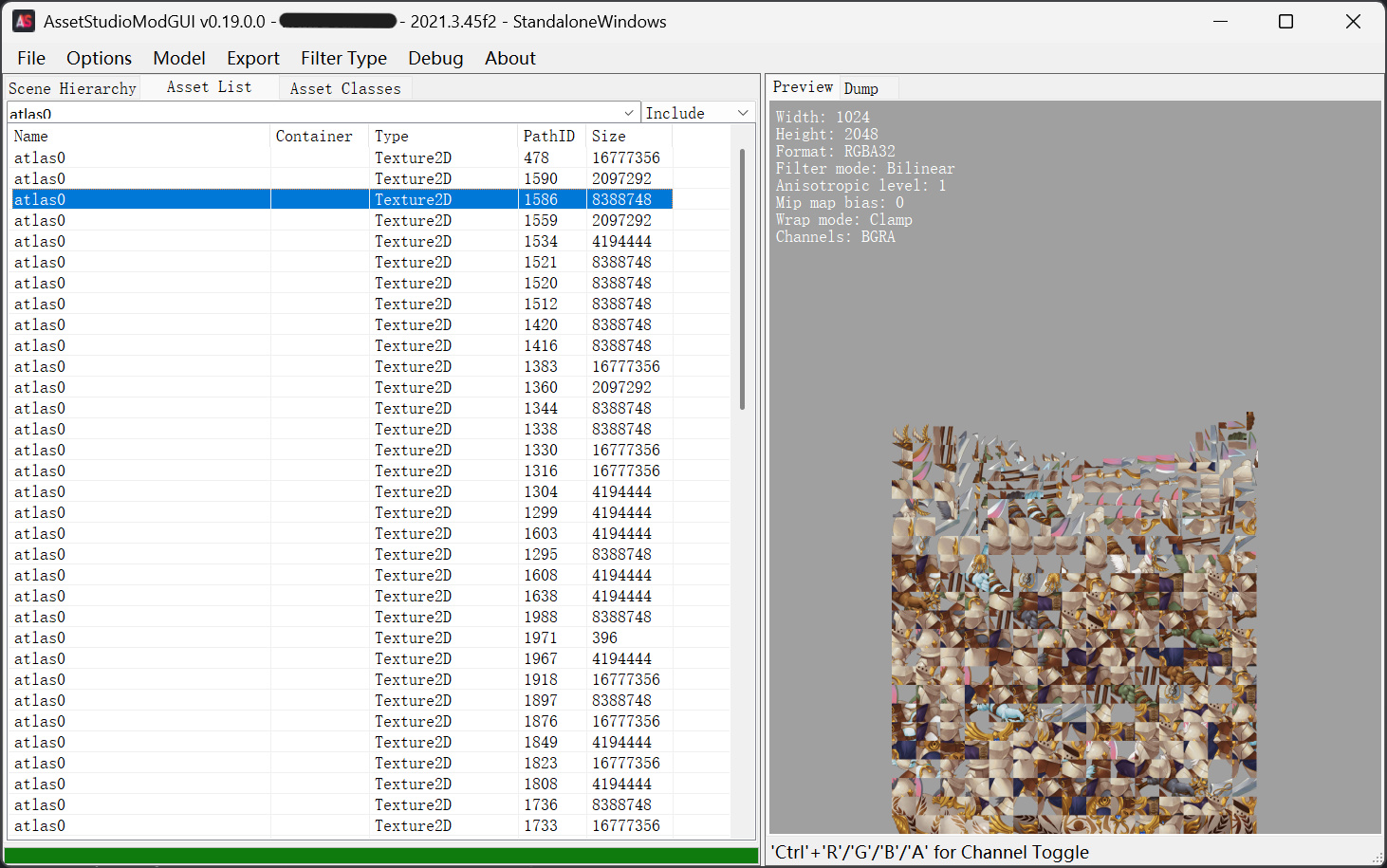
全都是atlas0
AS3

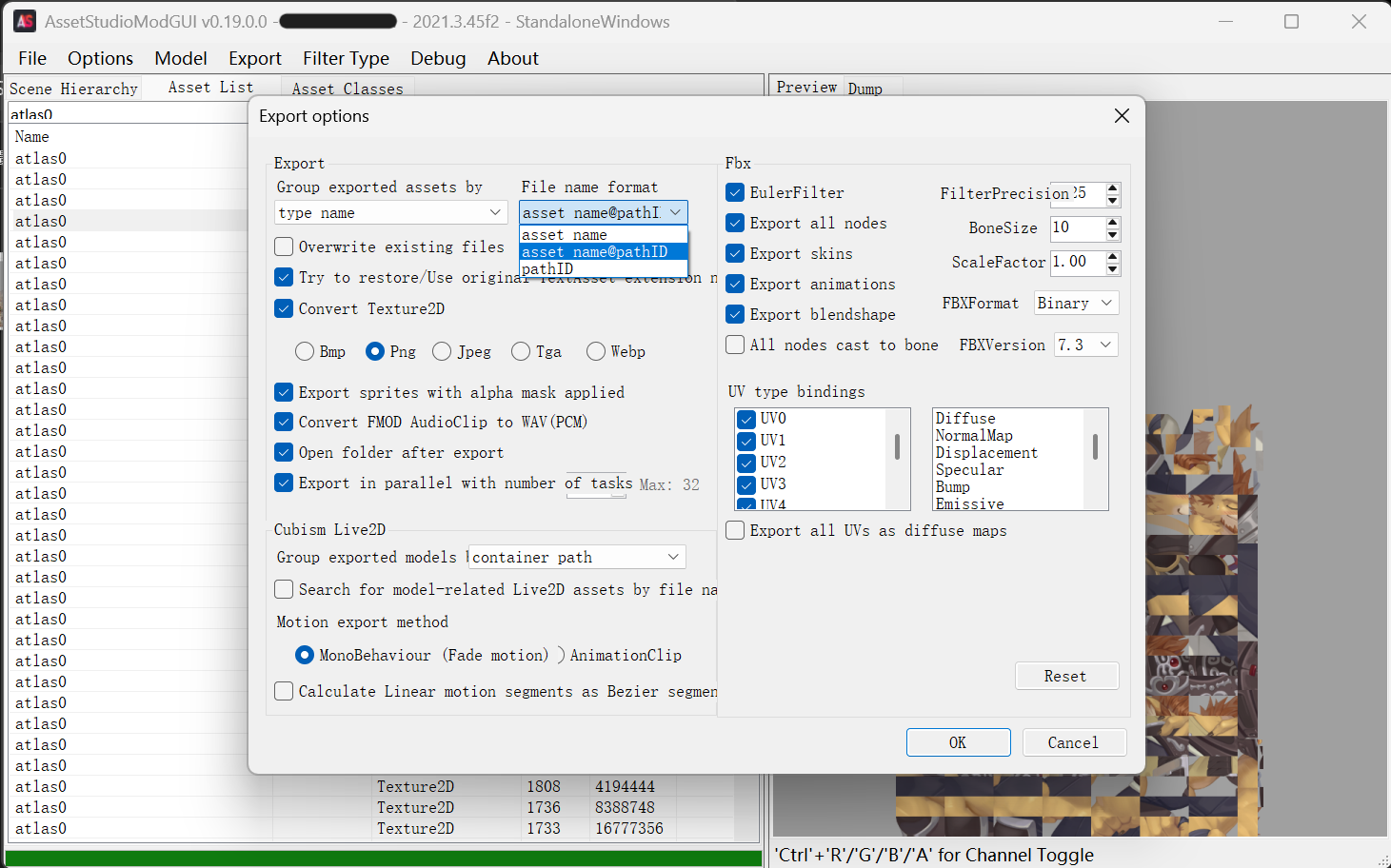
资源包中所有的图片都叫atlas0,导出的时候有些版本的AssetStudio居然让后导出的覆盖先导出的,好一些的则会添加一个(1)(2)之类,但是仅通过这些不足以确认图片与坐标文件的对应关系。好在从上面坐标文件中可以看到,游戏自己肯定也不是靠文件名定位,有PathID可以唯一地确定一个资源文件。

AssetStudio中可以看到每个文件的PathID,有的版本可以将其加入文件名导出,我们需要这些信息。上面提到的继任者(详见AssetStudio章节)可以在Options里找到导出选项,选中文件名+PathID,再次导出。这次所有的atlas0名字都是atlas0 @xxx.png,能够直接使用了。
export

代码,来

让gpt大人读取一份坐标文件,并写出对应的代码。我选了一份最小的坐标文件给它分析,节约一下大模型的上下文。

1
2
3
4
5
6
7
8
9
10
11
12
13
14
15
16
17
18
19
20
21
22
23
24
25
26
27
28
29
30
31
32
33
34
35
36
37
38
39
40
41
42
43
44
45
46
47
48
49
50
51
52
53
54
55
56
57
58
59
60
61
62
63
64
65
66
67
68
69
70
71
72
73
74
75
76
77
78
79
80
81
82
83
84
85
86
87
88
89
90
91
92
93
94
95
96
97
98
99
100
101
102
103
104
105
106
107
108
109
110
111
112
113
114
115
116
117
118
119
120
121
122
123
124
125
126
127
128
129
130
131
132
133
134
135
136
137
138
139
140
141
142
143
144
145
146
147
148
149
150
151
152
153
154
155
156
157
158
159
{
"m_GameObject": {
"m_FileID": 0,
"m_PathID": 5472
},
"m_Enabled": 1,
"m_Script": {
"m_FileID": 1,
"m_PathID": 2968
},
"m_Name": "",
"version": 3,
"materialIdsValid": true,
"needMaterialInstance": false,
"spriteDefinitions": [
{
"name": "effect_flash",
"boundsData": [
{
"x": 0.0,
"y": 0.0,
"z": 0.0
},
{
"x": 2.0,
"y": 2.0,
"z": 0.0
}
],
"untrimmedBoundsData": [
{
"x": 0.0,
"y": 0.0,
"z": 0.0
},
{
"x": 2.0,
"y": 2.0,
"z": 0.0
}
],
"texelSize": {
"x": 1.0,
"y": 1.0
},
"positions": [
{
"x": -1.0,
"y": -1.0,
"z": 0.0
},
{
"x": 1.0,
"y": -1.0,
"z": 0.0
},
{
"x": -1.0,
"y": 1.0,
"z": 0.0
},
{
"x": 1.0,
"y": 1.0,
"z": 0.0
}
],
"normals": [],
"tangents": [],
"uvs": [
{
"x": 0.250125,
"y": 0.250125
},
{
"x": 0.499875,
"y": 0.250125
},
{
"x": 0.250125,
"y": 0.499875
},
{
"x": 0.499875,
"y": 0.499875
}
],
"normalizedUvs": [],
"indices": [
0,
3,
1,
2,
3,
0
],
"material": {
"m_FileID": 0,
"m_PathID": 325
},
"materialId": 0,
"sourceTextureGUID": "2899d7bf5f87246c6b17fff1de8a909c",
"extractRegion": false,
"regionX": 0,
"regionY": 0,
"regionW": 0,
"regionH": 0,
"flipped": 0,
"complexGeometry": false,
"physicsEngine": 0,
"colliderType": 0,
"customColliders": [],
"colliderVertices": [],
"colliderIndicesFwd": [],
"colliderIndicesBack": [],
"colliderConvex": false,
"colliderSmoothSphereCollisions": false,
"polygonCollider2D": [],
"edgeCollider2D": [],
"attachPoints": []
}
],
"premultipliedAlpha": false,
"material": {
"m_FileID": 0,
"m_PathID": 0
},
"materials": [
{
"m_FileID": 0,
"m_PathID": 325
}
],
"textures": [
{
"m_FileID": 0,
"m_PathID": 1971
}
],
"pngTextures": [],
"materialPngTextureId": [
0
],
"textureFilterMode": 1,
"textureMipMaps": false,
"allowMultipleAtlases": false,
"spriteCollectionGUID": "6d939f4549c8c45609998f34b92f0729",
"spriteCollectionName": "ScreenFlashCollection",
"assetName": "",
"loadable": false,
"invOrthoSize": 2.0,
"halfTargetHeight": 0.5,
"buildKey": 71548416,
"dataGuid": "6188d729d0c0844dfb205984c6c47078",
"managedSpriteCollection": false,
"hasPlatformData": false,
"spriteCollectionPlatforms": [],
"spriteCollectionPlatformGUIDs": []
}

其中texture属性的值为1971,它是一个很小的效果图,因此坐标也很简单,只包含四个positions值。

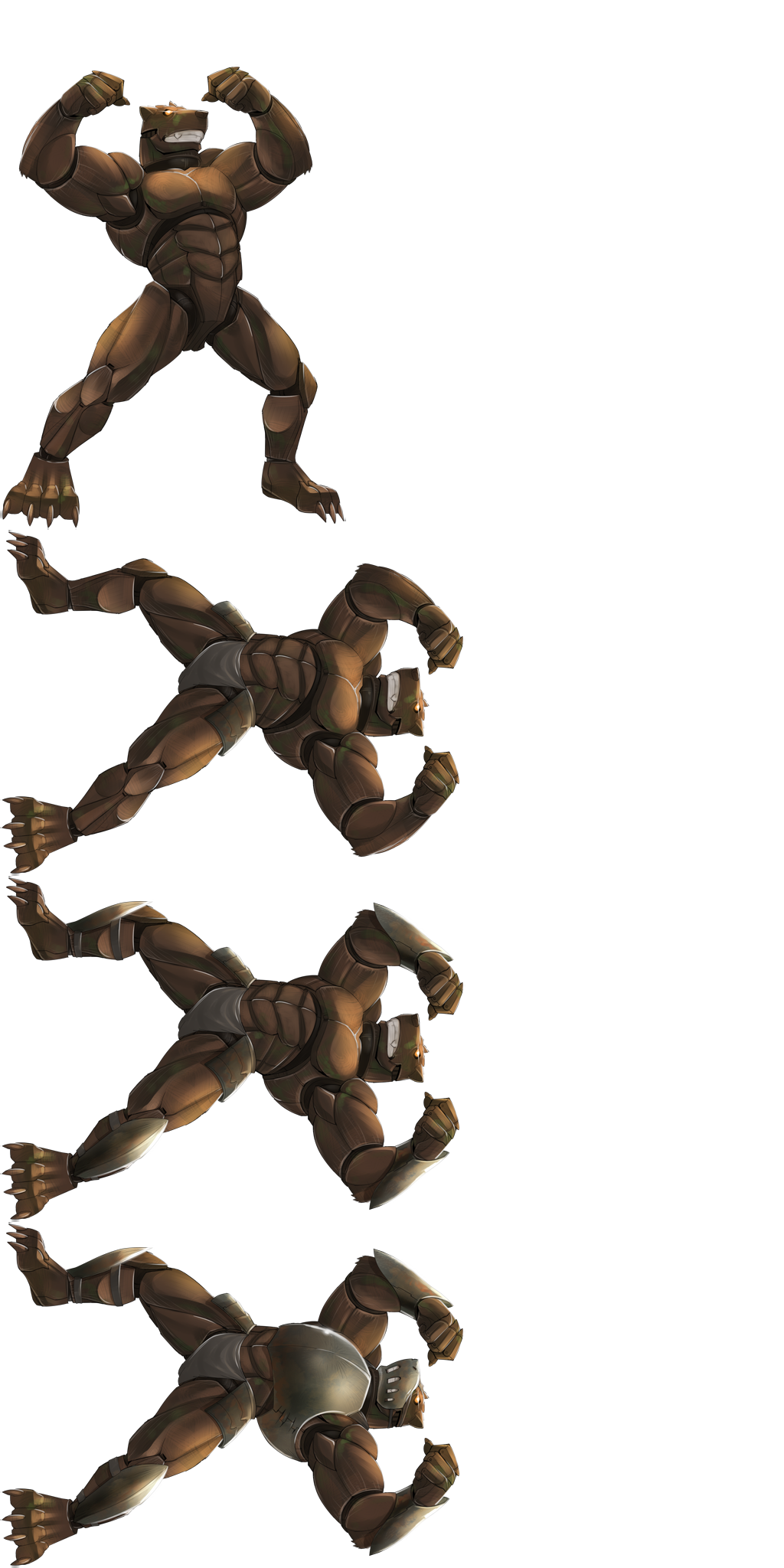
……然后AI就开始偷懒了,AI直接误以为四个坐标对应矩形的四个角,因此把每个碎块图都当成一整个矩形,进行了简单缩放就输出。可想而知对于一张图中包含很多碎块的图片来说,就根本没有还原。
atlas0 @1420

其实不算完全错,但是只适用于这种简单、没有怎么切碎的图案。显然这张大图可以分割为四个小图,因此按照坐标切开旋转即可。但是对于更多的碎图则完全不适用,毕竟碎图不只是把图片放在一起,同样的碎块为节约空间只需要保存一份,索引信息indices肯定也需要解析的。

因此最后拷打gpt 5.6 sol写了脚本,这次能够正确把所有的小碎块都视为面片拼接了。代码如下。

1
2
3
4
5
6
7
8
9
10
11
12
13
14
15
16
17
18
19
20
21
22
23
24
25
26
27
28
29
30
31
32
33
34
35
36
37
38
39
40
41
42
43
44
45
46
47
48
49
50
51
52
53
54
55
56
57
58
59
60
61
62
63
64
65
66
67
68
69
70
71
72
73
74
75
76
77
78
79
80
81
82
83
84
85
86
87
88
89
90
91
92
93
94
95
96
97
98
99
100
101
102
103
104
105
106
107
108
109
110
111
112
113
114
115
116
117
118
119
120
121
122
123
124
125
126
127
128
129
130
131
132
133
134
135
136
137
138
139
140
141
142
143
144
145
146
147
148
149
150
151
152
153
154
155
156
157
158
159
160
161
162
163
164
165
166
167
168
169
170
171
172
173
174
175
176
177
178
179
180
181
182
183
184
185
186
187
188
189
190
191
192
193
194
195
196
197
198
199
200
201
202
203
204
205
206
207
208
209
210
211
212
213
214
215
216
217
218
219
220
221
import json
import re
import shutil
from pathlib import Path

from PIL import Image, ImageDraw


ROOT = Path(__file__).resolve().parent
MONO_DIR = ROOT / "MonoBehaviour"
TEXTURE_DIR = ROOT / "Texture2D"
OUT_DIR = ROOT / "extracted_tk2d"
REPORT_PATH = ROOT / "extract_tk2d_report.json"


def safe_name(name):
name = name.strip() or "unnamed"
return re.sub(r'[<>:"/\\|?*\x00-\x1f]', "_", name)


def path_id_from_texture(texture_path):
match = re.search(r"@\s*(\d+)$", texture_path.stem)
if not match:
return None
return int(match.group(1))


def texture_index():
textures = {}
for texture_path in TEXTURE_DIR.glob("*.png"):
path_id = path_id_from_texture(texture_path)
if path_id is not None:
textures[path_id] = texture_path
return textures


def texture_ref(data):
refs = []
for ref in data.get("textures") or []:
refs.append(("textures", ref.get("m_PathID")))
for ref in data.get("pngTextures") or []:
refs.append(("pngTextures", ref.get("m_PathID")))

if len(refs) != 1:
return None, f"expected exactly one atlas reference, got {len(refs)}"
return refs[0], None


def should_skip_sprite(sprite):
return not sprite.get("name") and not sprite.get("sourceTextureGUID")


def output_layout(sprite):
bounds = sprite.get("untrimmedBoundsData") or sprite.get("boundsData") or []
if len(bounds) >= 2:
center = bounds[0]
size = bounds[1]
width = int(round(abs(size.get("x", 0))))
height = int(round(abs(size.get("y", 0))))
if width > 0 and height > 0:
min_x = center.get("x", 0) - size.get("x", 0) / 2
max_y = center.get("y", 0) + size.get("y", 0) / 2
return width, height, min_x, max_y

positions = sprite.get("positions") or []
if not positions:
return None

xs = [position["x"] for position in positions]
ys = [position["y"] for position in positions]
min_x = min(xs)
max_y = max(ys)
return int(round(max(xs) - min_x)), int(round(max_y - min(ys))), min_x, max_y


def affine_coefficients(dst, src):
(x0, y0), (x1, y1), (x2, y2) = dst
(u0, v0), (u1, v1), (u2, v2) = src
denominator = x0 * (y1 - y2) + x1 * (y2 - y0) + x2 * (y0 - y1)
if abs(denominator) < 1e-8:
return None

a = (u0 * (y1 - y2) + u1 * (y2 - y0) + u2 * (y0 - y1)) / denominator
b = (u0 * (x2 - x1) + u1 * (x0 - x2) + u2 * (x1 - x0)) / denominator
c = (u0 * (x1 * y2 - x2 * y1) + u1 * (x2 * y0 - x0 * y2) + u2 * (x0 * y1 - x1 * y0)) / denominator
d = (v0 * (y1 - y2) + v1 * (y2 - y0) + v2 * (y0 - y1)) / denominator
e = (v0 * (x2 - x1) + v1 * (x0 - x2) + v2 * (x1 - x0)) / denominator
f = (v0 * (x1 * y2 - x2 * y1) + v1 * (x2 * y0 - x0 * y2) + v2 * (x0 * y1 - x1 * y0)) / denominator
return a, b, c, d, e, f


def render_sprite(image, sprite):
positions = sprite.get("positions") or []
uvs = sprite.get("uvs") or []
indices = sprite.get("indices") or []
layout = output_layout(sprite)
if not layout or not positions or len(positions) != len(uvs) or len(indices) < 3:
return None

out_width, out_height, min_x, max_y = layout
result = Image.new("RGBA", (out_width, out_height), (0, 0, 0, 0))
atlas_width, atlas_height = image.size

for offset in range(0, len(indices) - 2, 3):
tri_indices = indices[offset:offset + 3]
if any(index >= len(positions) for index in tri_indices):
continue

dst = []
src = []
for index in tri_indices:
position = positions[index]
uv = uvs[index]
dst.append((position["x"] - min_x, max_y - position["y"]))
src.append((uv["x"] * atlas_width, (1.0 - uv["y"]) * atlas_height))

left = int(max(0, min(point[0] for point in dst)))
top = int(max(0, min(point[1] for point in dst)))
right = int(min(out_width, max(point[0] for point in dst) + 1))
bottom = int(min(out_height, max(point[1] for point in dst) + 1))
if right <= left or bottom <= top:
continue

local_dst = [(x - left, y - top) for x, y in dst]
coeffs = affine_coefficients(local_dst, src)
if coeffs is None:
continue

patch = image.transform((right - left, bottom - top), Image.Transform.AFFINE, coeffs, Image.Resampling.BICUBIC)
mask = Image.new("L", (right - left, bottom - top), 0)
ImageDraw.Draw(mask).polygon(local_dst, fill=255)
result.paste(patch, (left, top), mask)

return result


def unique_output_path(folder, name):
path = folder / f"{safe_name(name)}.png"
if not path.exists():
return path

stem = path.stem
for index in range(2, 10000):
candidate = folder / f"{stem}_{index}.png"
if not candidate.exists():
return candidate
raise RuntimeError(f"Too many duplicate names for {name!r}")


def extract_collection(json_path, textures):
with json_path.open("r", encoding="utf-8") as file:
data = json.load(file)

ref, error = texture_ref(data)
if error:
return {"json": json_path.name, "exported": 0, "skipped": [], "error": error}

texture_kind, texture_id = ref
texture_path = textures.get(texture_id)
if texture_path is None:
return {"json": json_path.name, "exported": 0, "skipped": [], "error": f"missing {texture_kind} atlas {texture_id}"}

collection_name = safe_name(data.get("spriteCollectionName") or json_path.stem)
output_folder = OUT_DIR / collection_name
output_folder.mkdir(parents=True, exist_ok=True)

exported = 0
skipped = []
with Image.open(texture_path) as image:
image = image.convert("RGBA")
for index, sprite in enumerate(data.get("spriteDefinitions") or []):
if should_skip_sprite(sprite):
skipped.append({"index": index, "name": "", "reason": "empty placeholder sprite"})
continue

restored = render_sprite(image, sprite)
if restored is None:
skipped.append({"index": index, "name": sprite.get("name", ""), "reason": "invalid geometry"})
continue

output_path = unique_output_path(output_folder, sprite.get("name") or f"sprite_{index:04d}")
restored.save(output_path)
exported += 1

return {
"json": json_path.name,
"collection": collection_name,
"texture": texture_path.name,
"textureKind": texture_kind,
"exported": exported,
"skipped": skipped,
}


def main():
if OUT_DIR.exists():
shutil.rmtree(OUT_DIR)
OUT_DIR.mkdir(parents=True, exist_ok=True)
textures = texture_index()
report = []

for json_path in sorted(MONO_DIR.glob("*.json")):
report.append(extract_collection(json_path, textures))

with REPORT_PATH.open("w", encoding="utf-8") as file:
json.dump(report, file, ensure_ascii=False, indent=2)

exported = sum(item.get("exported", 0) for item in report)
skipped = sum(len(item.get("skipped", [])) for item in report)
errors = [item for item in report if item.get("error")]
print(f"collections: {len(report)}")
print(f"exported: {exported}")
print(f"skipped sprites: {skipped}")
print(f"collection errors: {len(errors)}")
print(f"output: {OUT_DIR}")
print(f"report: {REPORT_PATH}")


if __name__ == "__main__":
main()

不过跑一遍需要一个小时,为了确认代码的有效性,进行了多次尝试,其中辛酸按下不表。总之最后跑出来了,很令人高兴,看到完整的立绘比什么都好。

出了一个错误

虽然看到立绘一个接一个生成很高兴,但是最后检查report发现有一个错误,交给gpt排查一下,很快发现有一个坐标文件和别的不同,它的textures是空的,而将数据藏在了pngTextures里。

1
2
3
4
5
6
7
"textures": [],
"pngTextures": [
{
"m_FileID": 0,
"m_PathID": 3702
}
]

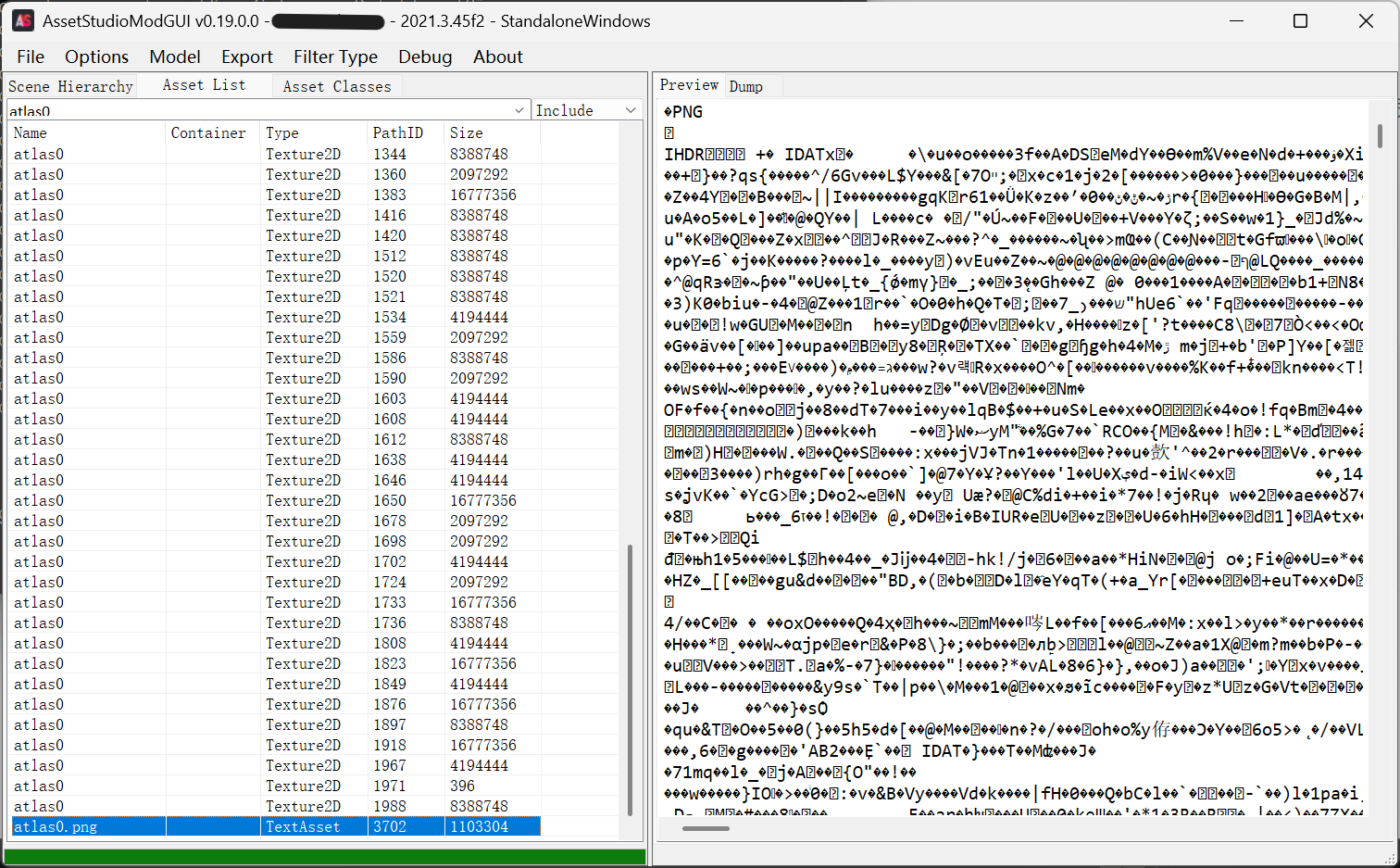
atlaspng

最后这个atlas0.png就很异常,它的类型是TextAsset,因此预览的结果是一堆乱码,好在从开头的PNG, IHDR等字段可以看出它大概率确实是一个png图片。从导出后的TextAsset文件夹找到它,名字改一改,同样放进Texture2D里,再让gpt适配一下代码,就可以正常解析了。

后续

为了写博客,代码进行了一些重构——原来AI认为直接取四个角放缩即可,后来读取别的坐标文件修正思路,修改代码居然没有去掉原先这个错误操作()如果没有这篇文章,屎山就堆起来了,一想到没用的分支逐渐堆积……嗯,很可怕。

以及不知道读者看到这里记不记得我提到过atlas0图片和tk2dSpriteCollectionData坐标文件都是83个,但是最后又多出来一个视为TextAsset的碎块图,这样atlas就有84个了。这很奇怪,于是我让AI又写了一份代码,验证每个坐标文件是否仅读取一张图片的PathID,如果确实如此就一一对应上,最后发现最开始提取出的83张图片,有一张并没有和坐标文件对应,其他的能对应上。由此可知,虽然我们小心提取了,但还是不慎多提取了一些无关的资源,好在这并不会对合成图片的结果产生影响。

故事其实还没有结束,自从我会了解析atlas以后,我就不断去找原来没解包出来的碎块游戏()除去tk2d以外还有另一类,因为没有明显的插件名字,而且分析更为简单,所以就简要讲一下。如果是近几年的新游戏,以下面这种方式制作碎块图可能还居多。

再启新篇

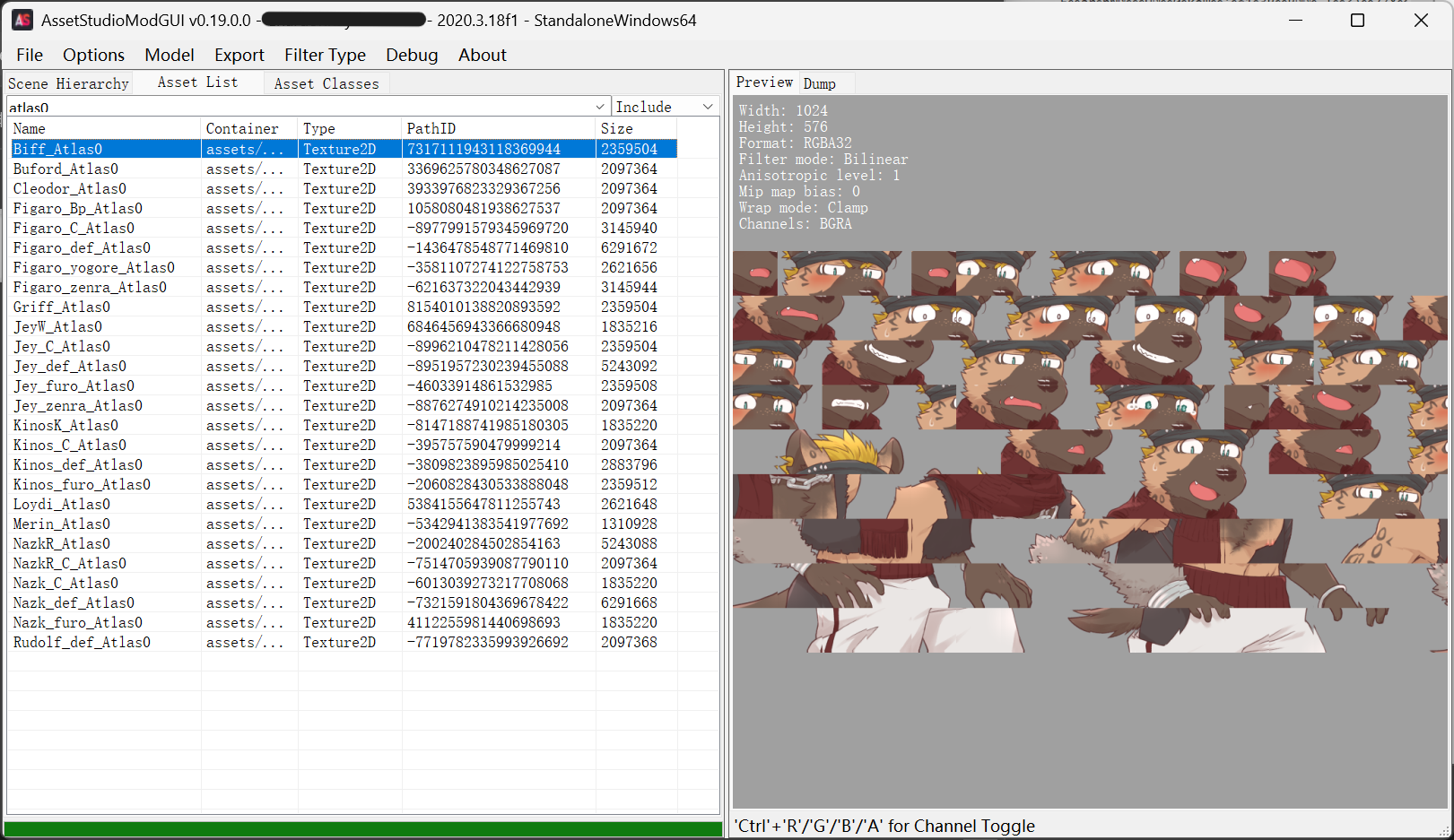
同样先搜索atlas0,这种方案的碎块图名字不叫atlas0了,而是“文件原来的名字”(我猜的),后面跟上_Atlas0

AS0

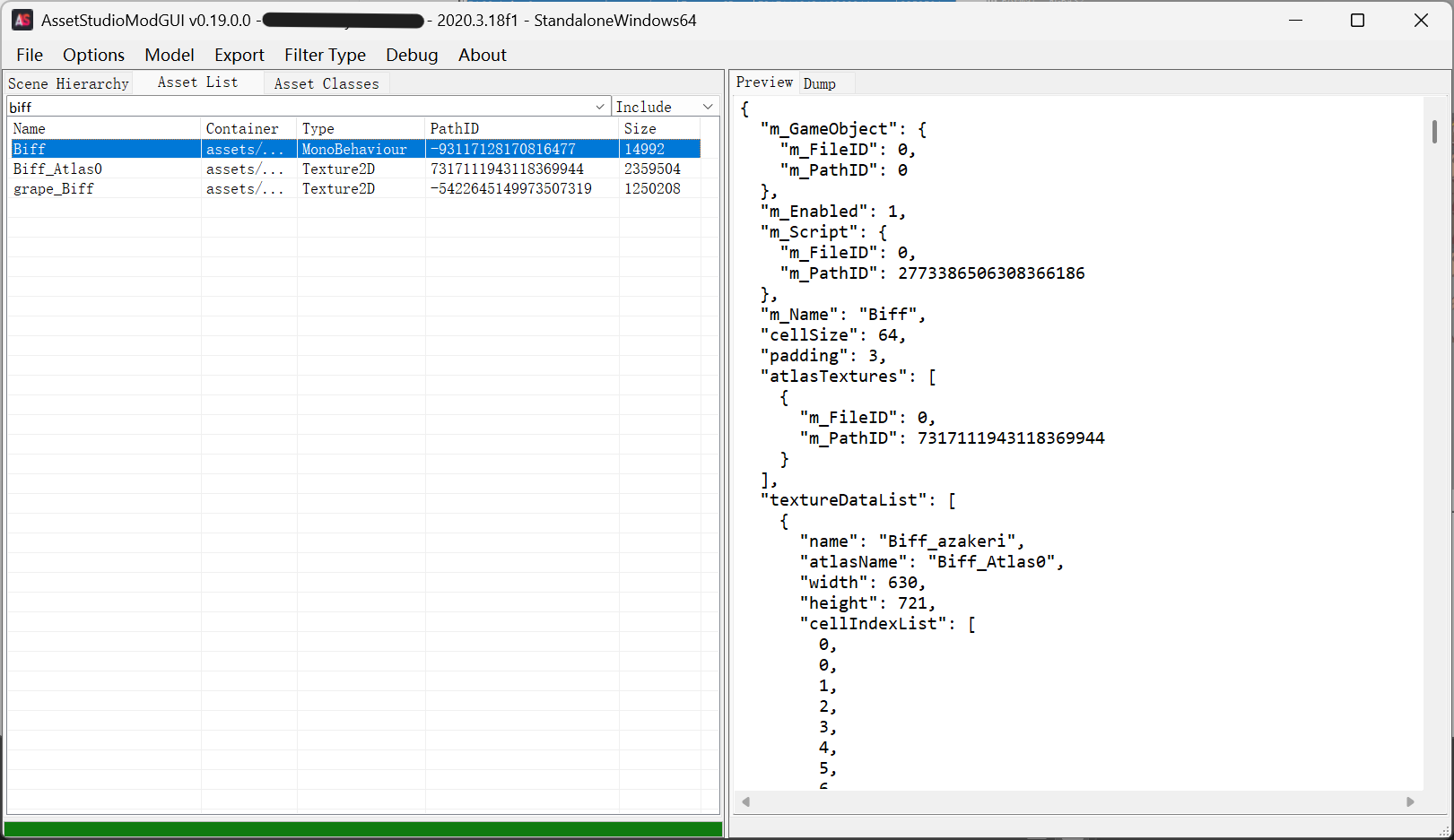
随便搜索一个文件名,就比如Biff吧。出现的结果里很显然有一个坐标文件,可以大胆猜想坐标文件的名字就是Atlas名字去掉后缀这个_Atlas0

AS01

这个甚至更直白了,直接把字段叫做atlasTextures,非常能够肯定坐标文件和atlas碎块图的对应关系,虽然文件里同样记录了PathID,但实际上只通过文件名都足够判别了。

不过保险起见,我还是让AI改成了使用PathID进行资源定位。前辈的代码处理的也正是这种方式的碎图,只需要进行少量修改即可完美使用。

1
2
3
4
5
6
7
8
9
10
11
12
13
14
15
16
17
18
19
20
21
22
23
24
25
26
27
28
29
30
31
32
33
34
35
36
37
38
39
40
41
42
43
44
45
46
47
48
49
50
51
52
53
54
55
56
57
58
59
60
61
62
63
64
65
66
67
68
69
70
71
72
73
74
75
76
77
78
79
80
81
82
83
84
85
86
87
88
89
90
91
92
93
94
95
96
97
98
99
100
101
102
103
104
105
106
107
108
109
110
111
112
113
114
115
116
117
118
119
120
121
122
123
124
125
126
127
128
129
130
131
132
133
134
135
136
137
138
139
140
141
142
143
144
145
146
147
148
149
150
151
152
153
154
155
156
157
158
159
160
161
162
163
164
165
166
167
168
169
170
171
172
173
174
import json
import math
import re
import shutil
import sys
from pathlib import Path

from PIL import Image


ROOT = Path(__file__).resolve().parent
MONO_DIR = ROOT / "MonoBehaviour"
TEXTURE_DIR = ROOT / "Texture2D"
OUT_DIR = ROOT / "extracted_cell_atlas"
REPORT_PATH = ROOT / "extract_cell_atlas_report.json"


def safe_name(name):
name = (name or "").strip() or "unnamed"
return re.sub(r'[<>:"/\\|?*\x00-\x1f]', "_", name)


def path_id_from_texture(texture_path):
match = re.search(r"@\s*(-?\d+)\s*$", texture_path.stem)
if not match:
return None
return int(match.group(1))


def texture_index():
textures = {}
for texture_path in TEXTURE_DIR.glob("*.png"):
path_id = path_id_from_texture(texture_path)
if path_id is not None:
textures[path_id] = texture_path
return textures


def is_cell_atlas(data):
return (
isinstance(data.get("atlasTextures"), list)
and isinstance(data.get("textureDataList"), list)
and "cellSize" in data
and "padding" in data
)


def atlas_path_id(data):
refs = [ref.get("m_PathID") for ref in data.get("atlasTextures") or []]
refs = [r for r in refs if r]
if len(refs) != 1:
return None, f"expected exactly one non-null atlas reference, got {len(refs)}"
return refs[0], None


def build_cells(image, cell_size, padding):
padded = cell_size - padding * 2
width, height = image.size
count_x = math.ceil(width / cell_size)
count_y = math.ceil(height / cell_size)

cells = []
for y in range(count_y - 1, -1, -1):
for x in range(count_x):
cell = image.crop((x * cell_size, y * cell_size, (x + 1) * cell_size, (y + 1) * cell_size))
cell = cell.crop((padding, padding, padding + padded, padding + padded))
cells.append(cell)
return cells, padded


def restore_texture(image, cells, padded, tex):
tex_width = tex["width"]
tex_height = tex["height"]
cell_x = math.ceil(tex_width / padded)
cell_y = math.ceil(tex_height / padded)
coords = [
(
xb * padded,
tex_height - (yb + 1) * padded,
(xb + 1) * padded,
tex_height - yb * padded,
)
for yb in range(cell_y)
for xb in range(cell_x)
]

result = Image.new(image.mode, (tex_width, tex_height))
warnings = 0
for count, cell_index in enumerate(tex.get("cellIndexList") or []):
if cell_index == 0:
continue
try:
result.paste(cells[cell_index], coords[count])
except IndexError:
warnings += 1
break
return result, warnings


def extract_collection(json_path, textures):
with json_path.open("r", encoding="utf-8") as file:
data = json.load(file)

if not is_cell_atlas(data):
return {"json": json_path.name, "exported": 0, "skipped": "not a cell atlas"}

path_id, error = atlas_path_id(data)
if error:
return {"json": json_path.name, "exported": 0, "error": error}

texture_path = textures.get(path_id)
if texture_path is None:
return {"json": json_path.name, "exported": 0, "error": f"atlas texture pathID {path_id} not found on disk"}

collection_name = safe_name(data.get("m_Name") or json_path.stem.split(" @")[0])
output_folder = OUT_DIR / collection_name
output_folder.mkdir(parents=True, exist_ok=True)

cell_size = data["cellSize"]
padding = data["padding"]

exported = 0
warned = 0
with Image.open(texture_path) as image:
cells, padded = build_cells(image, cell_size, padding)
for tex in data.get("textureDataList") or []:
restored, warnings = restore_texture(image, cells, padded, tex)
warned += warnings
out_path = output_folder / f"{safe_name(tex.get('name'))}.png"
restored.save(out_path)
exported += 1

return {
"json": json_path.name,
"collection": collection_name,
"texture": texture_path.name,
"cellSize": cell_size,
"padding": padding,
"exported": exported,
"cellIndexWarnings": warned,
}


def main():
only = sys.argv[1:]
OUT_DIR.mkdir(parents=True, exist_ok=True)
textures = texture_index()

json_paths = sorted(MONO_DIR.glob("*.json"))
if only:
json_paths = [p for p in json_paths if any(token.lower() in p.name.lower() for token in only)]

report = []
for json_path in json_paths:
result = extract_collection(json_path, textures)
report.append(result)
status = result.get("error") or result.get("skipped") or f"exported {result.get('exported')}"
print(f"{json_path.name:45} -> {status}")

with REPORT_PATH.open("w", encoding="utf-8") as file:
json.dump(report, file, ensure_ascii=False, indent=2)

exported = sum(item.get("exported", 0) for item in report)
errors = [item for item in report if item.get("error")]
print(f"\ncollections processed: {len(report)}")
print(f"textures exported: {exported}")
print(f"errors: {len(errors)}")
print(f"output: {OUT_DIR}")
print(f"report: {REPORT_PATH}")


if __name__ == "__main__":
main()

AI大人把这种碎块图存储方式叫做cell,上面那种更古老的叫tk2d,大概率是考虑到前辈的变量命名时出现了cellSize等,于是沿用了下来。充分说明了参考的重要性……现代AI还是很谨慎的,对已有代码开启自动跟随不会错。